-
![]()
Joey Albert
Joey has been involved with tech ever since she joined the EaseUS editor team in March 2011 and now she is a senior website editor. She is good at solving various issues, such as video downloading and recording.…Read full bio -
![]()
Alin
Alin is a sophisticated editor for EaseUS in tech blog writing. She is proficient in writing articles related to screen recording, voice changing, and PDF file editing. She also wrote blogs about data recovery, disk partitioning, data backup, etc.…Read full bio -
![]()
Gorilla
Gorilla joined EaseUS in 2022. As a smartphone lover, she stays on top of Android unlocking skills and iOS troubleshooting tips. In addition, she also devotes herself to data recovery and transfer issues.…Read full bio -
![]()
Rel
Rel has always maintained a strong curiosity about the computer field and is committed to the research of the most efficient and practical computer problem solutions.…Read full bio -
![]()
Dawn Tang
Dawn Tang is a seasoned professional with a year-long record of crafting informative Backup & Recovery articles. Currently, she's channeling her expertise into the world of video editing software, embodying adaptability and a passion for mastering new digital domains.…Read full bio -
![]()
Sasha
Sasha is a girl who enjoys researching various electronic products and is dedicated to helping readers solve a wide range of technology-related issues. On EaseUS, she excels at providing readers with concise solutions in audio and video editing.…Read full bio
Page Table of Contents

Myra
Updated on Jun 16, 2026
0 Views |
0 min read
Ever joined a friend's voice channel only to be blocked by a black screen and Discord stream error 2012? You are not alone. Officially classified by Discord as a "Video Viewer Timeout," this frustrating issue occurs when your client fails to establish a secure connection with the incoming media stream. Whether you are trying to watch a gameplay stream, a webcam feed, or a screen share, this error immediately disrupts your experience.
In this quick guide, we will break down exactly what causes the video viewer timeout and provide five proven, step-by-step solutions to fix Discord error 2012 so you can get back to streaming instantly.
Why Does Discord Error 2012 Happen?
To fix Discord error 2012 permanently, it helps to understand why it triggers. Officially categorized as a Video Viewer Timeout, this error indicates a handshake failure. Your Discord client successfully connects to the voice server, but it times out while trying to decode and display the incoming video packets.
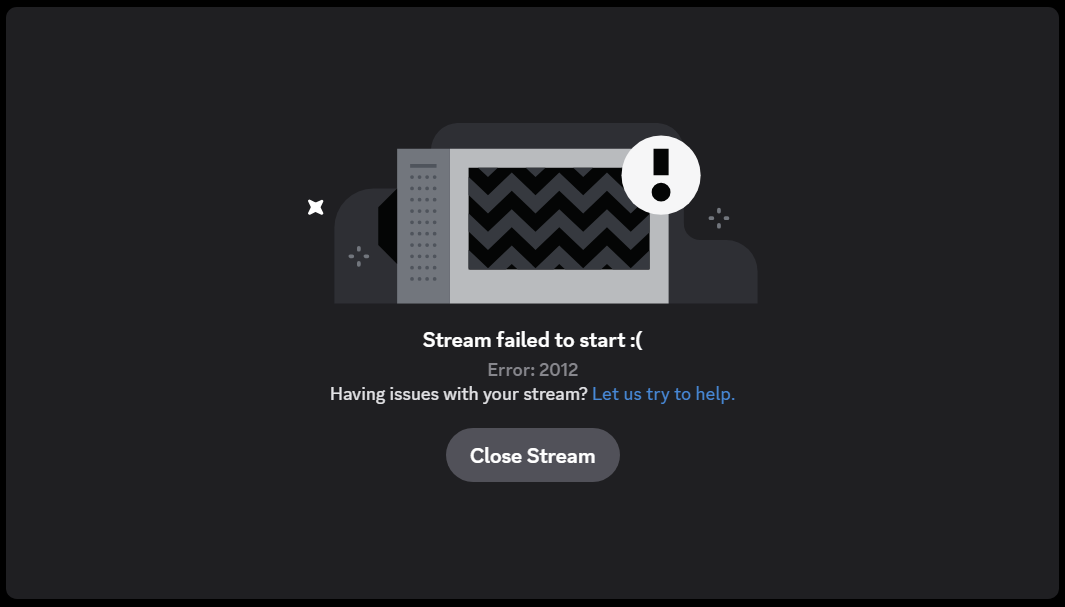
The most common technical culprits behind this timeout include:
- Hardware Acceleration Conflicts: Discord uses your GPU to smoothly render video. If your graphics card drivers are outdated or clash with Discord's hardware acceleration settings, the video stream will fail to load and freeze with a 2012 error.
- Corrupted Local App Cache: Discord stores temporary streaming files and protocols in hidden folders (AppData). Over time, these files can corrupt, causing data bottlenecks that prevent your video player from initializing.
- Network Adapter Offload Issues: Many network cards use a feature called Checksum Offload to process data. Sometimes, this system aggressively drops Discord's heavy UDP video packets, leading the client to believe the connection has timed out.
- VPN and DNS Interference: Virtual Private Networks (VPNs) and unstable ISP routing can drastically increase latency. If the video packets take too long to reach your device, Discord triggers the safety timeout mechanism.
Discord Stream Error 2012 Step-by-Step Fixes
Follow these five proven methods to resolve the video viewer timeout issue on your device.
Toggle Hardware Acceleration
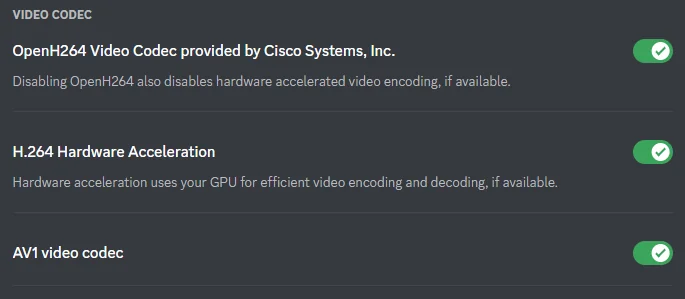
Discord uses your graphics card to process video. Toggling Hardware Acceleration resets the video rendering engine.
Step 1. Open Discord and click the gear icon to access User Settings.
Step 2. Scroll down to the left sidebar and click Advanced.
Step 3. Locate Hardware Acceleration and toggle it on if it was disabled.
Step 4. Click Okay to relaunch Discord and apply changes.
Delete Local AppData Cache
Corrupted temporary files often cause connection bottlenecks. Clearing them forces Discord to download fresh configuration files.
Step 1. Press Win + R on your keyboard to open the Run dialog box.
Step 2. Type %appdata% and hit Enter.
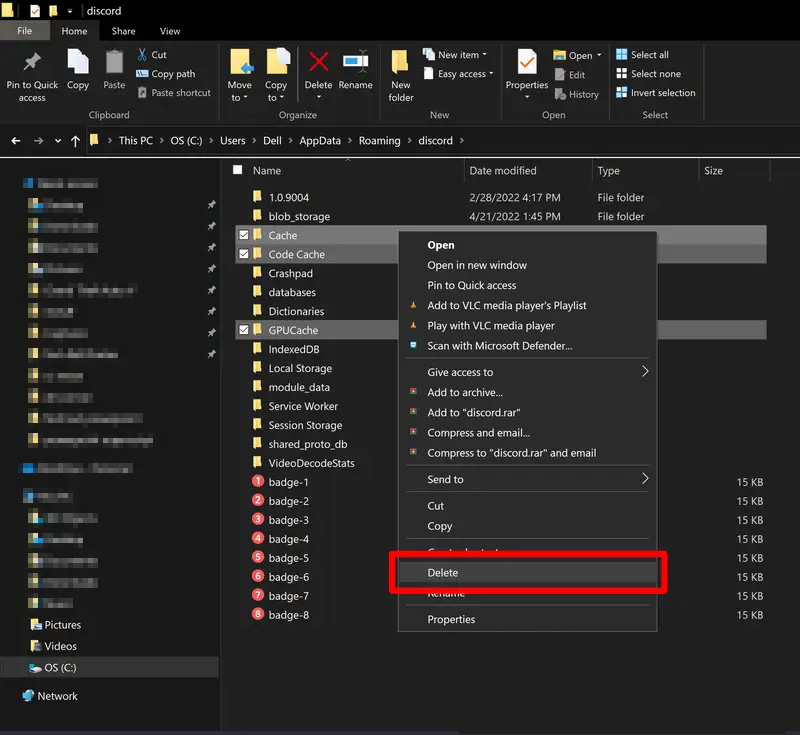
Step 3. Open the Discord folder. Locate and delete the Cache, Code Cache, and GPUCache folders.
Step 4. Restart Discord.
Switch to a Wired Ethernet Connection
Since Error 2012 stands for "Video Viewer Timeout," wireless Wi-Fi fluctuations or minor packet loss can immediately drop the heavy video encoding stream.
- Plug in an Ethernet Cable: Whenever possible, disconnect your PC or laptop from Wi-Fi and connect directly to your router using a physical LAN cable.
- The Benefit: A wired connection provides the lowest jitter and maximum data throughput, instantly bypassing the Wi-Fi timeout limits that cause Discord streamers to fail.
Disable VPNs, Proxies, and Accelerators
Virtual Private Networks (VPNs), proxy servers, and game network accelerators (like UU Accelerator) reroute your internet traffic through external servers. Because Discord's live streaming protocol (WebRTC) requires ultra-low latency, these rerouted paths frequently cause packet loss and data delays, triggering the Video Viewer Timeout error.
Follow these steps to clear your connection path:
Shut Down the Software: Completely close any active VPN, proxy client, or game booster application. Ensure they are not running in your system tray.
Reset Windows Proxy Settings:
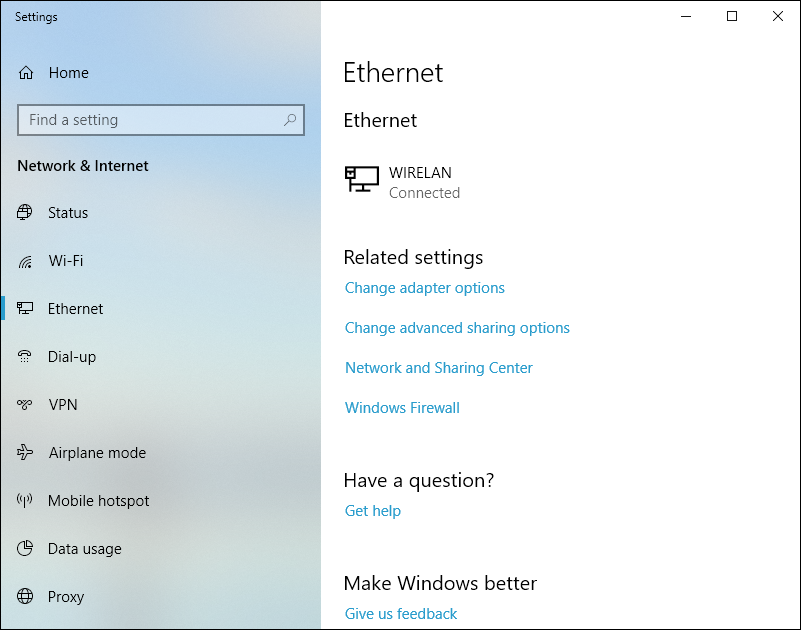
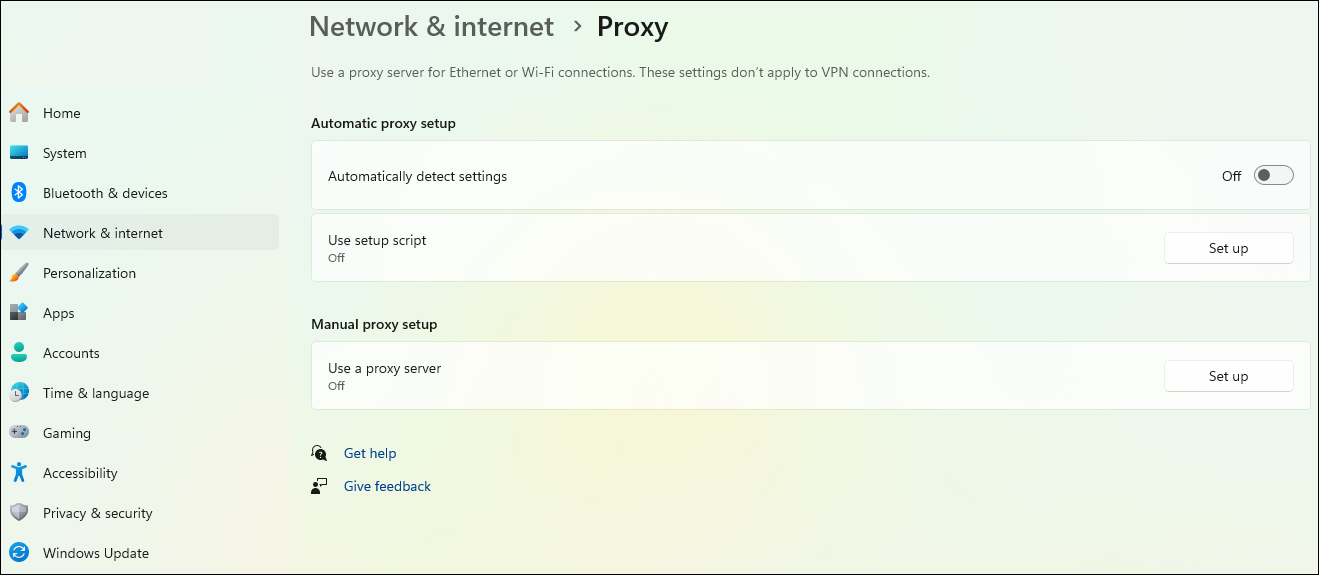
- Step 1. Go to Windows Settings > Network & Internet > Proxy.
- Step 2. Under Automatic Proxy Setup, toggle Automatically Detect Settings to ON.
- Step 3. Under Manual Proxy Setup, ensure Use A Proxy Server is turned OFF.
Device-Specific Tips
While the desktop client is most prone to the Video Viewer Timeout error, mobile users and time-sensitive viewers can use these targeted workarounds to bypass the glitch entirely.
- For Mobile Users: If your iPhone or iPad displays Error 2012, switch to a stable 5G/4G mobile data network, and reinstall the app from the App Store or clear deeply embedded system blockages.
- Use Discord Web as an Instant Bypass: If you are in a rush to watch a friend's stream or a live tournament and the desktop app keeps failing, the official browser client is your best temporary solution.
More Advanced Solutions for Discord Stream Error 2012
If basic troubleshooting like clearing your cache or toggling hardware acceleration hasn't resolved the issue, the root cause most likely lies deeper within your system's network configuration. If you are still staring at a black screen, implementing these technical adjustments will patch the structural bottlenecks causing the error.
Disable IPv6 Protocol
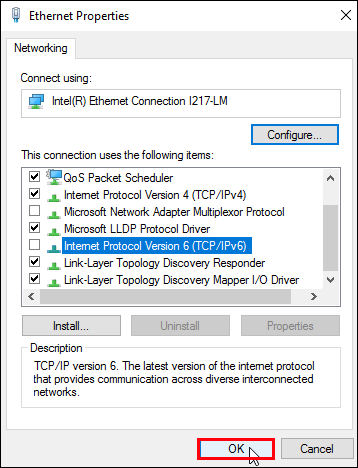
Discord's live video streams rely heavily on stable data packet handshakes. In many network setups, the IPv6 protocol triggers unexpected connection drops and causes the 2012 video timeout. Switching to IPv4 heavily stabilizes the feed.
Step 1. Press Win +R to open the Run dialog box, type ncpa.cpl, and click OK.
Step 2. Right-click on your active internet adapter (Wi-Fi or Ethernet) and select Properties.
Step 3. In the list, look for Internet Protocol Version 6 (TCP/IPv6). Uncheck the box next to it.
Step 4. Click OK to save the settings, restart Discord, and test the stream.
Disable NIC Offload Settings
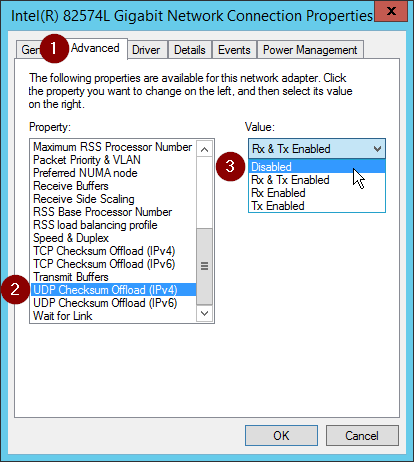
Network Interface Card (NIC) offloading can accidentally drop heavy Discord video packets. Disabling it stabilizes the data stream.
Step 1. Right-click the Windows Start button and select Device Manager.
Step 2. Double-click Network adapters to expand the list.
Step 3. Right-click your primary network card (e.g., Realtek or Intel) and select Properties.
Step 4. Go to the Advanced tab. Select Large Send Offload v2 (IPv4) and change its value to Disabled.
Step 5. Repeat the process to Disable both TCP Checksum Offload and UDP Checksum Offload.
Bonus Tip: Level Up Your Discord Experience with a Voice Changer
Now that your Discord stream and connection issues are fully resolved, why not take your voice channel interactions to the next level? Whether you want to spice up your gaming sessions, pull a hilarious prank on your friends, or simply protect your privacy during live streams, using a dedicated voice modulation tool is the perfect way to do it.
If you are looking for a reliable and lightweight voice changer for Discord, we highly recommend trying EaseUS VoiceWave.
EaseUS VoiceWave is a cutting-edge, real-time AI voice changer engineered specifically for gamers, streamers, and content creators. Unlike traditional tools that suffer from jarring static or lag, VoiceWave features ultra-low latency processing and seamless integration with Discord, OBS Studio, and major multiplayer games.
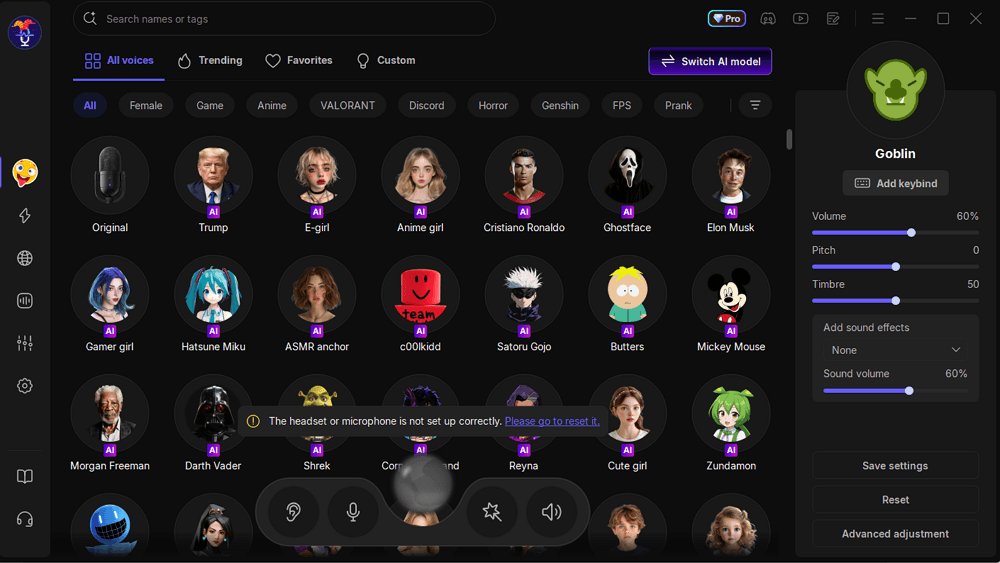
- Instantly transform your voice into over 400 unique choices, ranging from game characters and anime icons to celebrities and robotic tones.
- Elevate your stream or voice call on the fly by triggering popular meme sound presets and ambient audio clips via customizable hotkeys.
- It comes with a built-in background noise reducer that filters out clicking keyboards or loud PC fans, ensuring your modulated voice stays crystal clear.
Setting it up is simple—just launch EaseUS VoiceWave, select your preset, and switch your Discord input device to the virtual "VoiceWave Microphone" in your user settings to start surprising your friends instantly!
Conclusion
Encountering Discord stream error 2012 can easily ruin a watch party or a gaming session, but it is rarely a permanent issue. Because this "Video Viewer Timeout" error is rooted in temporary packet delivery failures, most users can resolve it instantly by simply clearing the app cache or toggling hardware acceleration.
If you are pressed for time and none of the local desktop fixes work immediately, remember that switching to the Discord Web version is your ultimate shortcut to bypass app glitches and watch your stream without lag.
FAQ
1. What does Discord Error 2012 mean?
Discord Error 2012 officially stands for "Video Viewer Timeout." It indicates that your Discord client successfully connected to the voice server but timed out while trying to establish, decode, or maintain the secure incoming video data stream from the broadcaster.
2. How do I fix a Discord stream that has sound but only shows a black screen?
This usually indicates a specialized software conflict rather than a network timeout. It happens when Discord lacks administrator permissions to capture a specific game, or when you are trying to stream copyright-protected content (like Netflix or Disney+ on Chrome). Running Discord as an Administrator or turning off your browser's hardware acceleration fixes the black screen instantly.
3. Why does this error happen specifically on Wi-Fi?
Wireless networks are prone to micro-fluctuations, channel interference, and brief packet loss. Because Discord's live streaming protocol requires a continuous, uninterrupted flow of data, even a split-second drop on a Wi-Fi connection can trigger the safety timeout mechanism.
4. What is the difference between Discord Error 2012 and Error 2011/2014?
According to Discord's Official Error Code Guide, Errors 2012 and 2015 are "Video Viewer Timeouts" (the problem is on the viewer's side, trying to receive data). On the other hand, Errors 2011 and 2014 are "Video Streamer Timeouts," meaning the person trying to share their screen or camera has an unstable connection or overloaded system resources, failing to upload the stream.
5. Why does my Discord stream show Error 2010?
Error 2010 triggers when you try to join a friend's stream that has already reached its maximum viewer limit. Standard Discord servers cap streams at 10 to 50 concurrent viewers, depending on active server boosts and platform events. You will have to wait for someone to leave the stream before you can join