-
![]()
Joey Albert
Joey has been involved with tech ever since she joined the EaseUS editor team in March 2011 and now she is a senior website editor. She is good at solving various issues, such as video downloading and recording.…Read full bio -
![]()
Alin
Alin is a sophisticated editor for EaseUS in tech blog writing. She is proficient in writing articles related to screen recording, voice changing, and PDF file editing. She also wrote blogs about data recovery, disk partitioning, data backup, etc.…Read full bio -
![]()
Gorilla
Gorilla joined EaseUS in 2022. As a smartphone lover, she stays on top of Android unlocking skills and iOS troubleshooting tips. In addition, she also devotes herself to data recovery and transfer issues.…Read full bio -
![]()
Rel
Rel has always maintained a strong curiosity about the computer field and is committed to the research of the most efficient and practical computer problem solutions.…Read full bio -
![]()
Dawn Tang
Dawn Tang is a seasoned professional with a year-long record of crafting informative Backup & Recovery articles. Currently, she's channeling her expertise into the world of video editing software, embodying adaptability and a passion for mastering new digital domains.…Read full bio -
![]()
Sasha
Sasha is a girl who enjoys researching various electronic products and is dedicated to helping readers solve a wide range of technology-related issues. On EaseUS, she excels at providing readers with concise solutions in audio and video editing.…Read full bio
Page Table of Contents

Gorilla
Updated on Jun 16, 2026
0 Views |
0 min read
Many FPS players report that Battlefield keeps crashing unexpectedly on PC during gameplay. Sometimes the game crashes to desktop without an error message, while in other cases it may crash on startup, while loading into a match, or in the middle of a game.
If you're experiencing Battlefield crashing on PC, don't worry—most of these issues can be fixed with a few troubleshooting steps. This guide explains why Battlefield keeps crashing on PC and provides practical solutions that have helped many players fix the problem.
Quick Answer:
Battlefield may crash on PC in several common situations, such as crashing on startup, crashing when loading into a match, crashing mid game, or suddenly closing to desktop without an error message. These problems are usually caused by outdated graphics drivers, corrupted game files, hardware limitations, or bugs introduced after a game update.
In many cases, you can fix Battlefield crashes by updating GPU drivers, verifying game files, disabling overlays, lowering graphics settings, or checking your system stability. The sections below explain the most common causes and step-by-step fixes that can help stop Battlefield from crashing.
Why Does Battlefield Keep Crashing on PC
Battlefield crashes can occur in different situations depending on your system configuration, game version, and background software. Below are the most common scenarios reported by PC players.
- 1️⃣ Battlefield Crashing on Startup
-
If Battlefield crashes immediately after launching, it's usually related to the game launcher, corrupted files, or outdated drivers. Players may notice that the game briefly opens before closing without any error message. In many cases, repairing the game installation or updating GPU drivers resolves the issue. Conflicts with antivirus software can also prevent the game from launching properly.
- 2️⃣ Battlefield Crashing When Loading Into a Match
-
Some players experience crashes when loading into a match or map, even if the main menu works fine. These crashes often result from shader compilation errors, insufficient RAM, or driver incompatibilities. The problem can be more noticeable after a recent update or if the graphics drivers aren't fully compatible with the latest game version. Ensuring that all drivers are up to date usually helps improve stability.
- 3️⃣ Battlefield Crashing Mid Game
-
Mid-game crashes typically occur during long play sessions, sometimes after 20–30 minutes of gameplay. Overheating GPUs, unstable CPU or GPU overclocking, and background applications consuming system resources are common culprits. When this happens, the game may suddenly close to the desktop, disrupting multiplayer matches and potentially causing progress loss.
- 4️⃣ Battlefield Crashing Without Error Message
-
Crashes without any error message can be particularly frustrating, as they offer no clear clue for troubleshooting. These issues often stem from DirectX runtime errors, driver timeouts, or memory leaks. Conflicts with overlays, monitoring tools, or other background applications can also trigger these silent crashes. Identifying the exact cause may require checking drivers, system stability, and running the game with minimal background programs.
- 5️⃣ Battlefield Crashing After an Update
-
After a new game patch or update, crashes can occur even if the game previously ran smoothly. Newly introduced bugs, shader cache conflicts, or outdated drivers are common reasons. Players sometimes report that certain maps or modes become unstable immediately after an update. Checking for the latest patches and updating drivers can often resolve these post-update issues.
- 6️⃣ Your PC Doesn't Meet Battlefield 6 System Requirements
-
In some cases, crashes happen simply because the PC does not meet the minimum or recommended hardware requirements. Running Battlefield on hardware below the recommended specifications can lead to performance instability and frequent crashes. Typical requirements include a modern multi-core CPU, at least 16 GB of RAM, a dedicated graphics card, and sufficient SSD storage. Ensuring your system meets these requirements can greatly reduce crash frequency.
How to Fix Battlefield Crashing on PC
If Battlefield keeps crashing on your PC, the following solutions can help resolve the issue. Try them one by one until the problem is fixed.
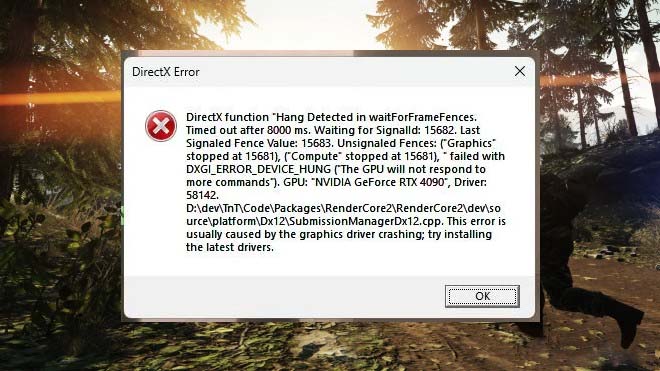
Fix 1: Update Your Graphics Drivers
Outdated graphics drivers are one of the most common causes of game crashes.
Make sure your GPU drivers are fully updated through your graphics card software. Updated drivers often include performance improvements and bug fixes specifically for newly released games.
Fix 2: Verify Battlefield Game Files
Corrupted game files can cause crashes during launch or gameplay.
If you installed Battlefield through Steam or the EA App, use the built-in verify or repair feature to check the integrity of the game files. This process will automatically replace any missing or corrupted files.
Fix 3: Disable In-Game Overlays
Game overlays can sometimes conflict with Battlefield and cause instability.
Try disabling overlays such as:
- Discord overlay
- Steam overlay
- Xbox Game Bar
After disabling them, restart the game and see if the crashing issue persists.
Fix 4: Close Background Applications
Some background applications consume large amounts of system resources and can interfere with the game.
Before launching Battlefield, close unnecessary programs such as:
- streaming software
- browser tabs
- hardware monitoring tools
This can help free up system memory and improve stability.
Fix 5: Update Windows
Running an outdated version of Windows can sometimes cause compatibility issues with modern games.
Check for system updates and install the latest Windows updates to ensure your system has the newest drivers and security patches.
Fix 6: Lower Graphics Settings
If your PC struggles to run Battlefield at high settings, lowering graphics options can reduce system load and prevent crashes.
Try reducing:
- texture quality
- shadow quality
- post-processing effects
Lowering these settings can significantly improve game stability.
Fix 7: Clear Shader Cache
Shader cache files can sometimes become corrupted, especially after game updates.
Clearing the shader cache allows the game to rebuild these files, which may resolve crashes related to graphics rendering.
Fix 8: Reinstall Battlefield
If none of the previous solutions work, reinstalling the game may help.
A fresh installation ensures that all game files are correctly installed and eliminates possible corruption from previous updates.
Fix 9: Check Your System Temperature
Overheating hardware can cause games to crash unexpectedly.
Monitor your CPU and GPU temperatures while playing. If temperatures are too high, consider:
- improving airflow in your PC case
- cleaning dust from fans
- adjusting fan curves
Keeping your hardware cool can improve both performance and stability.
Tips to Prevent Battlefield from Crashing Again
To reduce the chance of Battlefield crashing again, follow these best practices:
- Keep your graphics drivers up to date
- Avoid unstable CPU or GPU overclocking
- Close unnecessary background applications before launching the game
- Monitor system temperatures during long gaming sessions
Regular system maintenance can help keep your games running smoothly.
Extra Tip: Make Battlefield Voice Chat More Fun with a Voice Changer
Battlefield is not only about large-scale battles and tactical gameplay; it's also a highly social multiplayer experience. Many players use in-game voice chat or Discord to communicate with teammates during matches.
If you regularly play this game with friends, using a Battlefield voice changer can make your voice chat sessions much more entertaining. For example, some players enjoy role-playing as different characters, using funny voice effects, or simply surprising their squadmates during intense firefights.
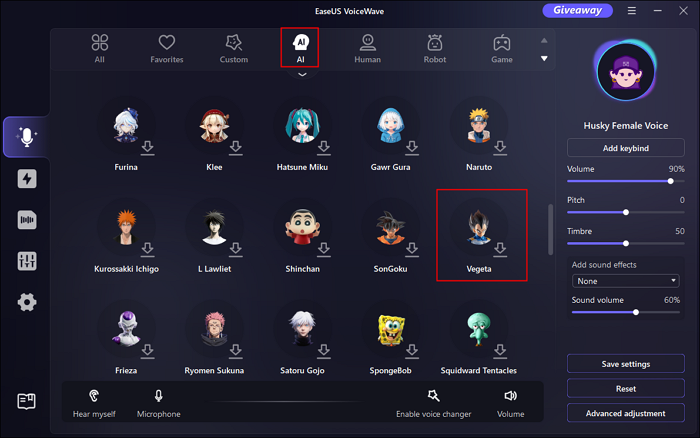
Tools like EaseUS VoiceWave allow players to modify their voice in real time while gaming. With different hundreds of voice filters and sound effects, you can change how your voice sounds during live conversations in games or voice chat platforms.
Many multiplayer FPS players use this voice changer to:
- create hilarious moments during matches
- role-play as different characters
- prank friends in voice chat
- make streaming or gaming sessions more entertaining
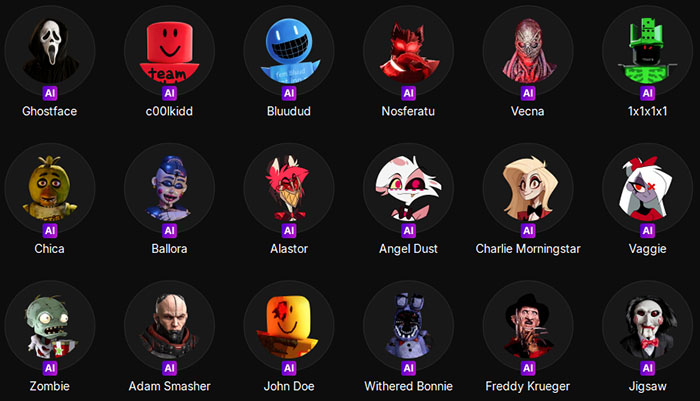
Since Battlefield battles often involve teamwork and communication, adding voice effects can make the overall gaming experience more fun—especially when playing with friends online.
FAQ About Battlefield Crashing
1. Why does Battlefield suddenly crash after 30 minutes of gameplay?
Some players report that Battlefield runs normally at first but crashes after 20–30 minutes. This is often related to GPU overheating, memory usage spikes, or unstable overclocking settings. Monitoring system temperatures and reducing graphics settings can sometimes help stabilize the game.
2. Why did Battlefield start crashing after the latest update?
Game updates sometimes introduce temporary bugs or compatibility issues with certain hardware configurations. If Battlefield started crashing after a recent patch, the issue may be related to driver compatibility or shader cache conflicts. Updating your GPU drivers or waiting for the next patch may resolve the problem.
3. Can overlays like Discord or Steam cause Battlefield crashes?
Yes. Overlays from applications such as Discord, Steam, or Xbox Game Bar can occasionally conflict with Battlefield and cause crashes. Disabling these overlays before launching the game can improve stability for some players.
4. Is Battlefield crashing a common issue on PC?
Occasional crashes can happen in many large multiplayer games, especially after updates. Because PC hardware configurations vary widely, some systems may encounter stability issues that others do not. Developers typically address widespread crashing problems in later patches.
5. What PC players are saying about Battlefield crashes?
Many PC players have reported similar crashing issues on community forums and gaming discussions. Players frequently mention problems such as Battlefield crashing without an error message, sudden crashes to desktop during matches, or the game crashing after the latest update.
Some players say the game runs normally in the menu but crashes when loading into a match. Others report that Battlefield works fine for the first 20–30 minutes before suddenly closing to the desktop.
Many users found that updating graphics drivers, verifying game files, or disabling overlays helped resolve the issue. However, others noted that crashes sometimes occur due to temporary bugs introduced in game updates, which developers later fix through patches.
Because Battlefield is a large-scale multiplayer shooter with complex environments and physics systems, even small compatibility issues between the game, drivers, and hardware can sometimes cause instability.