-
![]()
Joey Albert
Joey has been involved with tech ever since she joined the EaseUS editor team in March 2011 and now she is a senior website editor. She is good at solving various issues, such as video downloading and recording.…Read full bio -
![]()
Alin
Alin is a sophisticated editor for EaseUS in tech blog writing. She is proficient in writing articles related to screen recording, voice changing, and PDF file editing. She also wrote blogs about data recovery, disk partitioning, data backup, etc.…Read full bio -
![]()
Gorilla
Gorilla joined EaseUS in 2022. As a smartphone lover, she stays on top of Android unlocking skills and iOS troubleshooting tips. In addition, she also devotes herself to data recovery and transfer issues.…Read full bio -
![]()
Rel
Rel has always maintained a strong curiosity about the computer field and is committed to the research of the most efficient and practical computer problem solutions.…Read full bio -
![]()
Dawn Tang
Dawn Tang is a seasoned professional with a year-long record of crafting informative Backup & Recovery articles. Currently, she's channeling her expertise into the world of video editing software, embodying adaptability and a passion for mastering new digital domains.…Read full bio -
![]()
Sasha
Sasha is a girl who enjoys researching various electronic products and is dedicated to helping readers solve a wide range of technology-related issues. On EaseUS, she excels at providing readers with concise solutions in audio and video editing.…Read full bio
Page Table of Contents

Sasha
Updated on Jun 16, 2026
0 Views |
0 min read
Marvel Rivals, a team-based, multiplayer hero shooter game, has introduced a new feature, Voice Changer, with its latest October 16 game update. We already know that this FPS game allows real-time communication between teammates to coordinate strategies, such as calling out enemy positions, warning about ultimates, or sharing strategies. How the new feature helps improve your game experience, keep reading to learn about Marvel Rivals' voice changer feature, and some alternatives are also recommended.
Quick Answer: Marvel Rivals has a built-in voice changer with 5 presets like Symbiote and Alien. To use it: Settings > Audio > Voice Chat > Voice Changer. However, the in-game feature is limited. If you want more AI voices, funny effects, or Marvel character voices, you can use tools like EaseUS VoiceWave.
In-Game Voice Changer vs EaseUS VoiceWave:
If you're wondering whether the built-in feature is enough or if you should upgrade, here's a quick comparison:
| Feature | Marvel Rivals In-Game | EaseUS VoiceWave |
| Voice Filters | 5 presets | 300+ AI voices |
| Customization | Limited | Advanced voice tuning & effects |
| Soundboard | Not available | 300+ soundboards with meme & movie clips |
| Character Voices | Basic styles only | AI-generated character-style voices (such as Iron Man, Spider-Man, Captain America, Doctor Strange, Loki, Thor, Venom, Deadpool, Jeff .etc) |
| Real-Time Performance | Yes | Yes (low latency) |
#Key Takeaways: The in-game voice changer is great for quick fun, but if you want more realistic AI voices, soundboards, and full customization, VoiceWave gives you a much more immersive experience in Marvel Rivals.
Best AI Voice Changer for Marvel Rivals (More Voices & Soundboards)
If the built-in voice changer in Marvel Rivals feels a bit limited, that's where a more powerful tool like EaseUS VoiceWave comes in.
Imagine this during a match: you're calling out enemy positions with a deep, intimidating voice like Venom, then dropping iconic Marvel-style lines right in the middle of a team fight. A moment later, you switch to a robotic AI voice just to troll your teammates, or fully commit to roleplaying as a different hero for the entire match. That's exactly the kind of immersive and entertaining experience VoiceWave unlocks.
That's exactly the kind of experience VoiceWave unlocks.
🎙️ Pre-set Marvel AI Voices for Roleplay
With 600+ AI voices and soundboards, you can go far beyond the basic in-game presets. You can search Marvel-related AI voices as follows. For example, you can use Iron Man, Spider-Man, Captain America, Doctor Strange, Loki, Thor, Venom, Deadpool, Jeff, or Wolverine. Besides, our voice library includes many popular voices and sound effects. The library is constantly expanding. If you have any sound effects you would like to add, please let us know.
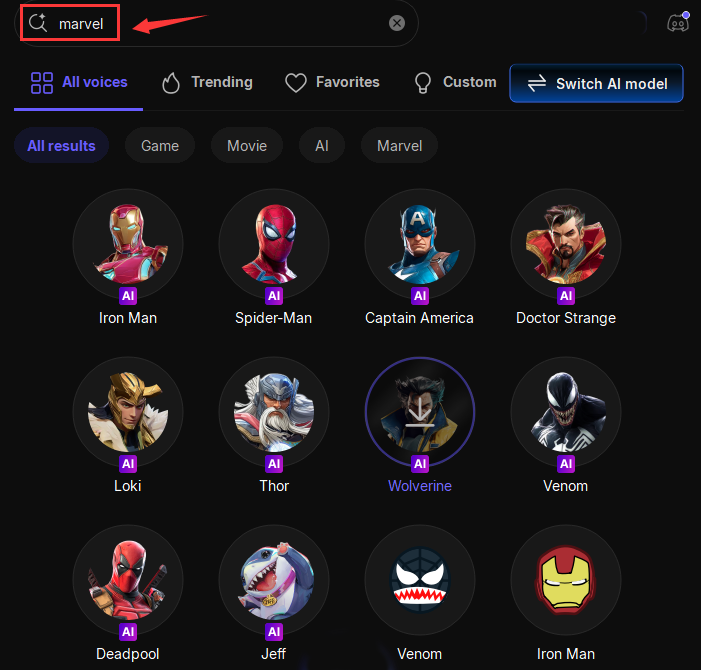
VoiceWave lets you transform your voice instantly with low latency — perfect for Marvel Rivals voice chat and competitive gameplay.
🧬 Create Your Own Marvel-Style Voice
Want something unique? You can even clone and customize voices.
- Upload or record a sample to generate a similar AI voice
- Add effects like echo, reverb, or robotic filters
- Fine-tune your voice to match a hero or villain style
This gives you way more flexibility than the default Marvel Rivals voice filters.
⚡ Easy Setup for Marvel Rivals
Getting started only takes a few steps:
- Install and open VoiceWave
- Select your preferred AI voice or soundboard
- In Marvel Rivals, set your input device to "VoiceWave Microphone"
Once set up, your modified voice works instantly in-game.
💡 Why Upgrade from the In-Game Voice Changer?
While Marvel Rivals offers a fun starting point, it's still quite limited. VoiceWave gives you:
- More voices (300+ vs 5 presets)
- Real AI-generated character voices
- Soundboard integration
- More control and creativity
If you're serious about roleplay, content creation, or just having fun with friends, it's a noticeable upgrade.
You could preview from here!
Original
Modified
Marvel Rivals Built-in Voice Changer
Thought using a real-time voice changer like Voicemod software is one of the most commonly used tricks employed by Rivals players. NetEase has added a voice changer option to in-game settings. This feature comes with the October 16 game update, allowing you to make yourself sound like a monstrous Symbiote or a spooky Pumpkin Monster. There are 5 preset voice filters available.
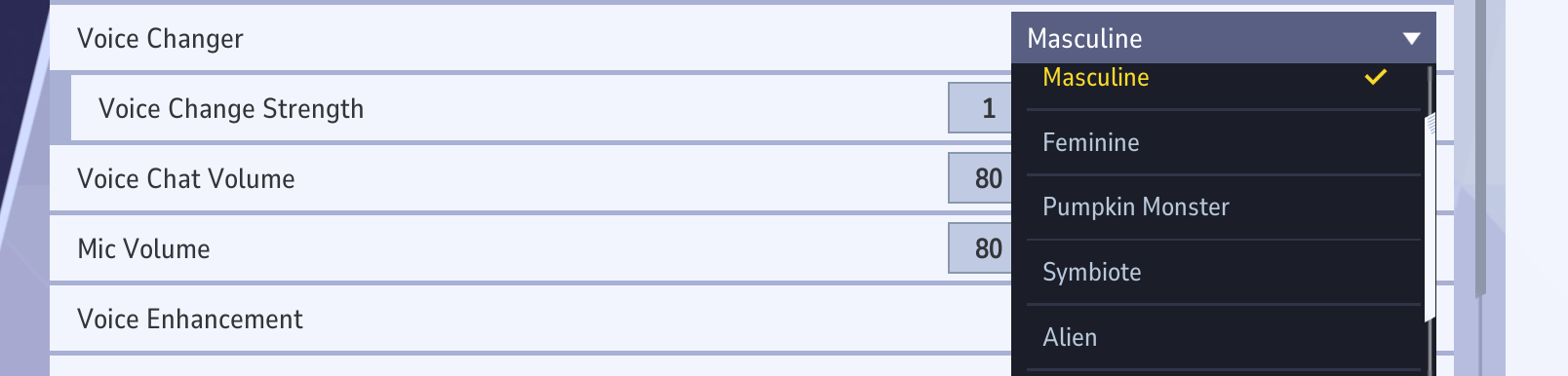
Masculine - Deep, Commanding, and Grounded: This filter drops your vocal pitch to create a fuller, heavier tone — think of it as giving your voice a cinematic bass boost. It's perfect for players who want to sound more authoritative in team chats or simply mask their natural voice without sounding too artificial. The result is smooth, bold, and convincingly natural.
Feminine - Bright, Light, and Expressive: The Feminine preset raises your pitch for a softer, higher-toned sound. It adds clarity and a touch of playfulness to your voice — ideal for creators who want a lighter vocal presence or for role-playing different characters. Subtle enough for casual use, yet distinct enough to make you feel like you're embodying a new persona on the battlefield.
Pumpkin Monster - Rough, Creepy, and Theatrical: This one leans straight into Halloween territory. The Pumpkin Monster filter layers your voice with gravelly distortion and eerie resonance, producing a raspy, undead growl that feels tailor-made for horror or supernatural heroes like Ghost Rider. It's the go-to choice for players who love dramatic flair — spooky, fun, and slightly unhinged in the best way possible.
Symbiote - Dark, Guttural, and Iconically Venom-Like: Easily the fan favorite. The Symbiote filter drenches your voice in deep growls, multi-layered echoes, and a sinister, almost liquid distortion that captures the essence of Venom's alien tone. It's gritty, menacing, and incredibly immersive. Perfect for tactical callouts that send shivers down your teammates' spines.
Alien - Synthetic, Futuristic, and Out-of-This-World: The Alien preset gives your voice a distinctly sci-fi twist. Expect modulated pitch shifts and a shimmering, robotic texture that feels right at home in the cosmos. It's ideal for playing as spacefaring heroes like Star-Lord or Luna Snow — cool, quirky, and unmistakably extraterrestrial.
How to Enable the Voice Changer Feature?
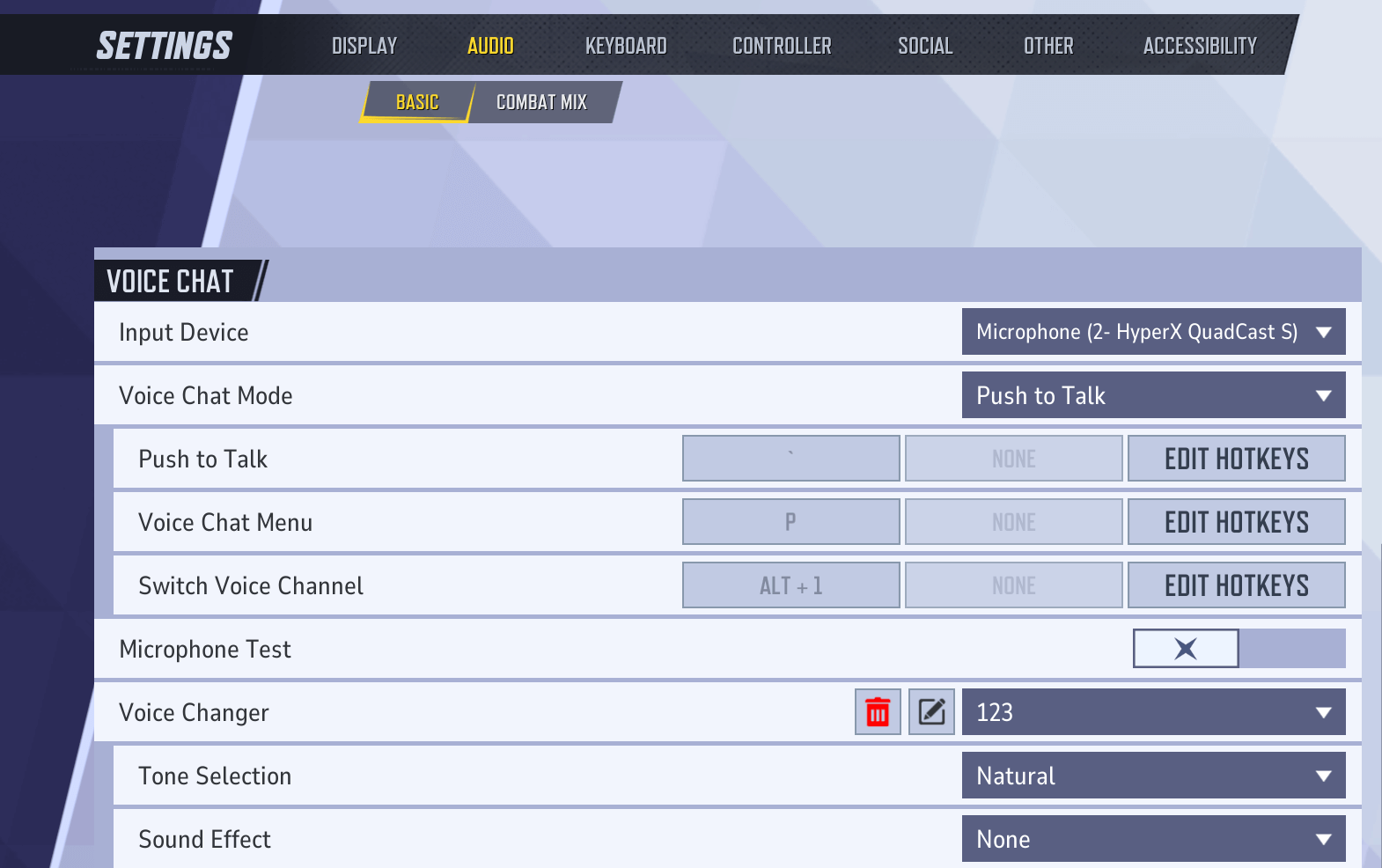
Step 1. Go to the "Settings" panel, and navigate to "AUDIO"> "BASIC" > "Voice Changer" under the "VOICE CHAT" menu.
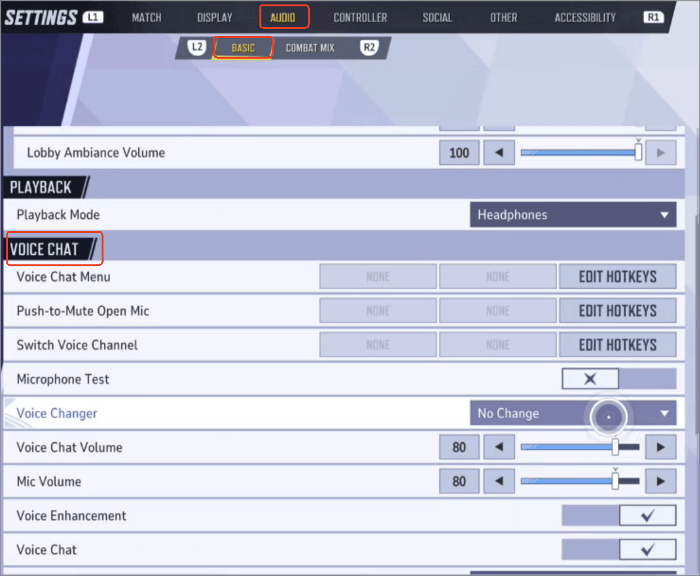
Step 2. Click the dropdown menu next to "Voice Changer," then choose a voice filter.
Then you can turn on "Microphone Test" to hear yourself over.
How to Create Custom Voice Filters?
In addition to preset voice filters, it also lets you create your own voice profile. By scrolling to the bottom of the voice changer dropdown list, you can see the "Add New Save" option. Then a small window will pop up. Give your voice profile a name, and then select tone from natural, masculine 1, 2, and 3, Feminine 1, 2, and 3, and add environmental sound effects like indoors, valley, robot, and walkie-talkie.
Although the custom voice changer doesn't offer a wide range of presets, combining its available tones and effects — and skillfully switching between them to match your character — can significantly enhance your overall gaming experience.Though many players are skeptical about this feature, arguing that it might harm the community or that the voice effects aren't particularly entertaining, an even larger group finds it intriguing, believing it could actually help reduce the likelihood of harassment toward female players.
Best Voice Changer Ideas for Marvel Rivals (Funny & Roleplay)
Using a voice changer in Marvel Rivals isn't just about hiding your real voice — it's about making the game more fun, immersive, and sometimes hilariously chaotic. Here are some of the most popular and creative ways players are using voice changers right now:
🎭 Sound Like a Symbiote (Venom-Style Deep Voice): With a low-pitch AI voice and slight echo effects, you can deliver callouts in a dark, intimidating tone, sound like a Marvel villain during fights, or make even simple lines feel cinematic. This works especially well if you're playing aggressively or leading your team.
🤖 Troll Teammates with Robot or Alien Voices: Using robot or alien voice filters, you can pretend you're an AI assistant giving "mission updates", act like an extraterrestrial teammate who doesn't understand humans, or completely confuse (or entertain) your squad. These funny voice filters in Marvel Rivals are super popular on Reddit and often lead to the most memorable in-game moments.
🎬 Use Soundboards for Marvel Quotes & Memes: With the right setup, you can play iconic Marvel lines like "I am inevitable", classic meme sounds during clutch moments, or funny reactions when teammates make mistakes. Characters like Iron Man or Thanos are perfect for this kind of roleplay.
🦹 Pretend to Be a Marvel Villain During Matches: You can speak in a dramatic tone like a boss character, announce your "plans" before team fights, or react to wins/losses in character. This kind of immersive roleplay is becoming increasingly popular in team-based games — especially when combined with AI voice changers for Marvel Rivals.
💡 Pro Tip: The built-in voice changer in Marvel Rivals is fun but limited. If you want more realistic AI voices, character-style effects, or advanced soundboards, using a dedicated tool like VoiceWave can unlock way more creative possibilities.
To Conclude
This blog has shared everything you need to know about Marvel Rivals' in-game voice changer and how to set it up quickly. If you're looking for more voice filters, sound effects, and soundboards, try powerful alternatives like EaseUS VoiceWave and Voicemod. Both tools offer extensive voice libraries and real-time customization options—perfect for bringing your favorite Marvel characters to life in every match.
FAQs on Marvel Rival Voice Changer Update
1. How to sound like Venom in Marvel Rivals?
To sound like Venom in Marvel Rivals, you can use the built-in Symbiote voice filter, which adds a deep, distorted, and growling effect. However, if you want a more realistic Venom-style voice, VoiceWave allow you to apply deeper pitch control, layered effects, and even custom voice profiles to better match Venom's iconic tone.
2. Why is Marvel Rivals voice chat not working?
If your Marvel Rivals voice chat is not working, here are the most common fixes:
- Make sure voice chat is enabled in Settings > Audio
- Check that the correct input device (microphone) is selected
- Test your mic using the in-game “Microphone Test” option
- Restart the game or reconnect your headset
- Disable conflicting audio software or virtual devices
If you're using a voice changer, ensure it's properly set as your input device, or your voice may not be detected.
3. How to change voice chat in Marvel Rivals?
To change voice chat in Marvel Rivals, go to Settings > Audio, enable voice chat, select your input device, and choose your preferred mode (Open Mic or Push to Talk).
4. Who is the voice announcer in Marvel Rivals?
The voice announcer in Marvel Rivals is Galacta, voiced by Cassandra Lee Morris.
5. How do I change my voice on voice chat?
You could use its in-game voice changer or use a third-party voice changer to change your voice into that of anyone in voice chat in Marvel Rivals. For other chat apps, EaseUS VoiceWave also works.
6. What is the best funny voice changer for Marvel Rivals?
The best funny voice changer for Marvel Rivals depends on how creative you want to get.
The in-game voice changer offers basic options like Alien or Pumpkin Monster, which are fun for casual use. But if you want more variety — such as robot voices, meme effects, or soundboards — a dedicated tool like VoiceWave provides far more options.
These tools are especially popular for trolling, roleplaying, and creating entertaining moments during matches or streams.