-
![]()
Joey Albert
Joey has been involved with tech ever since she joined the EaseUS editor team in March 2011 and now she is a senior website editor. She is good at solving various issues, such as video downloading and recording.…Read full bio -
![]()
Alin
Alin is a sophisticated editor for EaseUS in tech blog writing. She is proficient in writing articles related to screen recording, voice changing, and PDF file editing. She also wrote blogs about data recovery, disk partitioning, data backup, etc.…Read full bio -
![]()
Gorilla
Gorilla joined EaseUS in 2022. As a smartphone lover, she stays on top of Android unlocking skills and iOS troubleshooting tips. In addition, she also devotes herself to data recovery and transfer issues.…Read full bio -
![]()
Rel
Rel has always maintained a strong curiosity about the computer field and is committed to the research of the most efficient and practical computer problem solutions.…Read full bio -
![]()
Dawn Tang
Dawn Tang is a seasoned professional with a year-long record of crafting informative Backup & Recovery articles. Currently, she's channeling her expertise into the world of video editing software, embodying adaptability and a passion for mastering new digital domains.…Read full bio -
![]()
Sasha
Sasha is a girl who enjoys researching various electronic products and is dedicated to helping readers solve a wide range of technology-related issues. On EaseUS, she excels at providing readers with concise solutions in audio and video editing.…Read full bio
Page Table of Contents

Myra
Updated on Jun 16, 2026
0 Views |
0 min read
Quick Answer: No, Proximity Chat Does Not Use a Voice Changer
Proximity chat transmits your actual voice or whatever your microphone captures without any built-in voice alteration or changer. The system does not apply effects like pitch shifting, robot voices, or AI modifications by default. It’s designed to deliver natural, unaltered audio for immersive communication.
What Is Proximity Chat?
Proximity chat, also called proximity voice chat or spatial voice chat, is a voice communication system in multiplayer games in which players can only hear each other when their characters are physically near one another in the virtual environment. The audio volume decreases with distance and directionality, like 3D spatial sound, which often makes it feel realistic, as if you are hearing someone from the left, right, or behind.
Voices get louder and clearer as you approach, fading to a whisper or silence when far apart, creating natural immersion without global lobby noise. It shines in various games, including FPS and battle royales, like:
- Among Us (especially in VR/3D versions)
- Phasmophobia
- Call of Duty
- Lethal Company and similar co-op horror games
- Sea of Thieves
- Rust
- DayZ
- Fortnite
- VR titles like VRChat
How Proximity Chat Handles Voice
Proximity chat systems capture your microphone input directly and process it for spatial audio:
- Your raw voice is sent over the network from the mic to the game server, often via low-latency protocols like WebRTC.
- The system calculates player positions in real time to determine audibility, then routes packets only to nearby listeners, applying volume attenuation and 3D panning for directional realism.
- No automatic voice modulation or changing occurs. It’s your real voice or any external effects you apply before it reaches the game.
- Basic enhancements like noise suppression or echo cancellation may clean the signal for clarity, but no built-in filters change timbre, gender, or add effects.
Therefore, proximity chat transmits your unaltered voice with physics-based tweaks, such as muffling through walls. This keeps FPS moments authentic: hear footsteps fade as enemies retreat, or squad callouts sharpen up close.
Do Voice Changers Work with Proximity Chat?
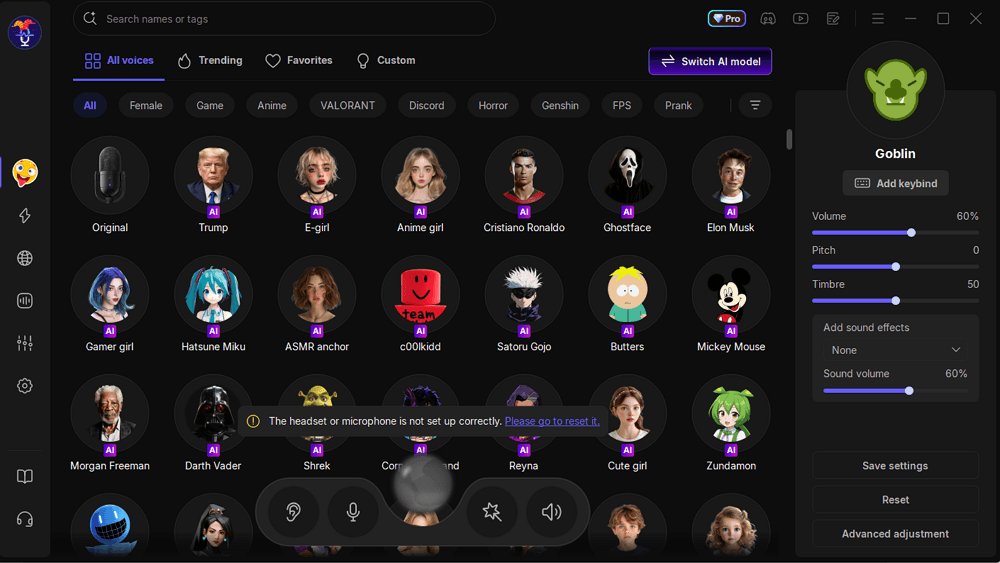
Absolutely! Third-party voice changers can work with proximity chat in most games. Popular tools like EaseUS VoiceWave, a real-time voice changer with effects, AI voices, and soundboards, are commonly used. This is popular for trolling in games like Fortnite, Call of Duty, VRChat, or Among Us. Many tutorials exist for setting it up specifically with proximity chat games.
To make it work:
Step 1. Download EaseUS VoiceWave, and pick a voice model.
Step 2. In the game, select the EaseUS VoiceWave virtual audio device as your input mic.
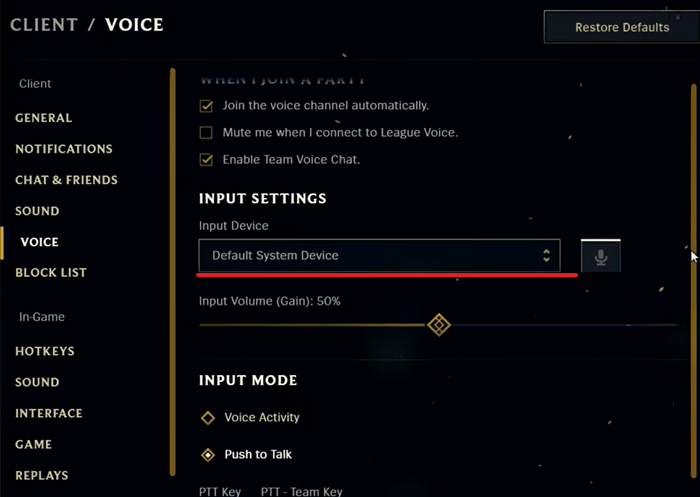
Step3. Your altered voice then gets transmitted through proximity chat as if it were your "real" input.
Pros of Using Voice Changers with Proximity Chat:
- Changing your voice from male to female, robot, or a celebrity will create cinematic moments such as distant whispers that intensify as enemies approach.
- Voice changers give you a trolling advantage in FPS games like Warzone. A deep voice coming from behind a wall can confuse opponents, spark panic, and go viral on streaming services.
- Enhance roleplay in social games like VRChat or Among Us. Squads can maintain character accents or personas that naturally fade with distance.
- Popular tools like EaseUS VoiceWave integrate seamlessly as virtual microphones. They add no latency to Proximity Chat while offering over 300+ real-time AI effects for endless customization.
Potential Issues and Fixes for Proximity Chat
Proximity chat can encounter audio glitches, especially when paired with voice changers, but most stem from settings mismatches or software conflicts.
No voice transmission or one-way hearing.
This often happens if game voice settings conflict with system mics or push-to-talk is misconfigured. You can fix this by verifying "Voice Chat" is enabled in-game, disabling "Mute Game Voice Chat" in console overlays (PS5 Game Base), and setting your mic (or VoiceWave virtual mic) as the default in game settings.
Audio lag, echo, or crackling during proximity.
Background apps like voice clones or noise suppression on headsets interfere. Close them, switch to wired Ethernet for lower ping, or toggle noise cancellation off in headset software.
Voice changer not applying.
Confirm the changer software is running and set as the default mic; restart the game; some games require specific input devices.
| Common Issue | Likely Cause | Quick Fix |
| No sound | Muted overlays or wrong mic | Enable in Game Base; set default mic |
| Lag/crackling | Software conflicts | Close voice changer; update drivers |
| Echo | Open mic overlap | Switch to push-to-talk |
| Voice changer not working | Wrong default mic | Set the virtual mic as the default and restart the game |
Conclusion
Proximity chat enhances multiplayer gaming by making voice interactions feel natural and location-based, relying on your unmodified voice for authenticity. It doesn't include a built-in voice changer, which would defeat the purpose of realistic spatial audio.
However, players can easily layer on external voice changers for fun, trolling, or creative role-play in compatible games. Ultimately, the feature shines when used for genuine communication, creating memorable emergent moments that external voice apps can't replicate.
FAQs
Does proximity chat change your voice natively?
No, it only applies spatial effects like volume fading and direction. Your raw mic input stays unaltered.
Is proximity chat the same in every game?
No, it varies by implementation, such as range, fade-off speed, and 3D directionality, but the core idea is distance-based voice.
Can I turn off proximity chat?
Yes, most games let you disable it or switch to squad/party-only voice.
Will voice changers get me banned in FPS games?
Possibly in ranked modes if overused. Stick to casual lobbies and subtle effects to avoid detection.
Does proximity chat work on Xbox or PS5?
Yes, titles like Fortnite and Call of Duty support it natively; route voice changers via party chat or headset apps.